Migrating from manual booking systems: a club manager’s guide

- Migrating from manual booking systems involves planning, data cleaning, and staff training to ensure a smooth transition. Implementing structured phases like parallel running and fixed cut-off dates reduces booking errors and minimizes disruption. Proper change management and tailored platforms improve operational efficiency and revenue in racquet sports clubs.
Migrating from manual booking systems is defined as the process of replacing spreadsheets, paper logs, and phone-based reservation processes with automated digital scheduling software. For racquet sports clubs managing tennis, padel, or pickleball courts, this shift directly reduces double bookings, cuts administrative hours, and opens real-time court availability to members around the clock. Digital transformation research shows that 60% of migration success depends on change management, including staff training and communication, rather than the technical implementation alone. That figure reframes the entire project. Getting the software right matters, but getting your people ready matters more.
What does migrating from manual booking systems actually involve?
Switching booking systems means more than installing new software. It means auditing every record your club holds, cleaning that data, moving it safely into a new platform, and training your team to work differently from day one.

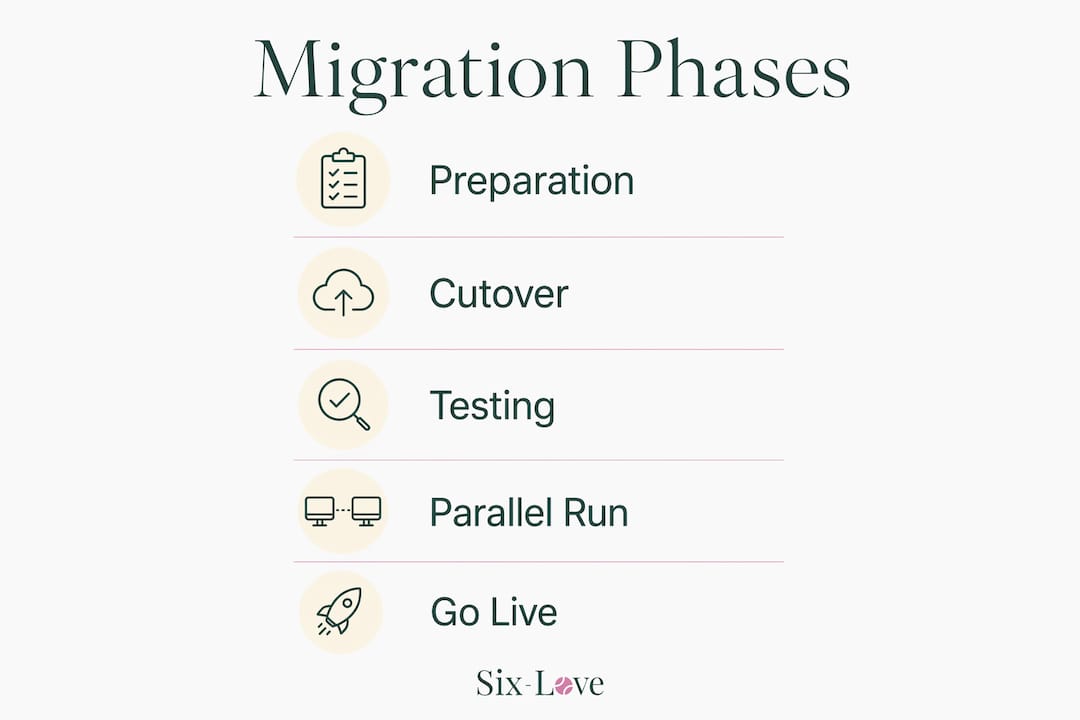
The industry term for this process is “booking system migration,” and it covers three distinct phases: preparation, cutover, and post-migration stabilisation. Club managers who treat it as a one-day software swap almost always encounter problems. Those who plan it as a structured project, with defined milestones and a clear timeline, report far smoother outcomes.
The benefits of online booking are well established for racquet sports venues. Members can reserve courts at midnight without calling reception. Staff stop fielding repetitive phone enquiries. Revenue reporting becomes automatic. Six-love clients have reported a 22% revenue increase within two months of going live, which reflects what happens when booking friction disappears entirely.
What prerequisites are essential before you start migration?
Preparation is the phase most club managers underestimate. Rushing into a new platform without auditing your existing data is the single most common cause of post-migration chaos.
Start by taking a full inventory of every place bookings currently live. That includes:
-
Spreadsheets on shared drives or individual laptops
-
Paper court booking sheets and reception diaries
-
Email threads confirming one-off reservations
-
WhatsApp or text message confirmations with members
-
Any existing entry-level booking apps your club may already use
Once you have located everything, classify records into three groups: active bookings (courts reserved in the next 90 days), recent history (the past 12 months), and archived data (anything older). Migrating only essential active data and archiving historical records externally prevents the migration from slowing down and maintains business continuity. Archive old data in static files such as PDFs or read-only spreadsheets rather than trying to import years of historical records into the new system.
Staff communication is equally critical at this stage. Your reception team, coaches, and court supervisors all need to understand what is changing and why. Brief them early, assign a point of contact for questions, and run at least one hands-on training session before go-live.
Pro Tip: Schedule your migration during your club’s lowest-activity window, ideally a mid-week overnight slot in the quietest four to six weeks of your calendar year. This minimises the risk of disrupting active members.
You will also need to confirm that your new platform can export data in a compatible format, supports a sandbox or test environment, and allows parallel operation alongside your old system during the transition period.
Step-by-step guide to switching booking systems without losing reservations
A structured migration follows a clear sequence. Skipping steps creates the errors that damage member trust and cost staff hours to fix.
-
Clean your data first. Remove duplicate member records, correct spelling inconsistencies in names and court labels, and standardise date formats across all spreadsheets. Cleaning and deduplicating data before migration reduces errors and workload during post-migration validation significantly.
-
Map courts to real inventory. Every court in your new system must correspond exactly to a physical court at your venue. Mismatches between court labels in the old and new systems are the leading cause of double bookings immediately after go-live.
-
Migrate active bookings first. Import all confirmed future reservations before anything else. Verify each one against your original records after import. Do not proceed until the counts match.
-
Run both systems in parallel. Industry guidance recommends running old and new systems simultaneously for 24 hours to four weeks, depending on booking complexity. During this period, all new bookings go into the new system only. The old system stays open in read-only mode for reference.
-
Remove write access from the old system on cutover day. Parallel runs of 24–72 hours allow the new system to handle bookings while the old system remains read-only. Removing write access on cutover day eliminates the risk of staff accidentally entering bookings in the wrong place.
-
Decommission the old system only after full confidence. Do not delete or close your old records until you have verified data accuracy in the new platform and your team has operated it successfully for at least two weeks.
Pro Tip: A phased pilot with 15–20 volunteer members over two to three weeks lets you identify workflow gaps before rolling out to your full membership. Choose members who book regularly and will give honest feedback.
| Migration phase | Key action | Risk if skipped |
|---|---|---|
| Data cleaning | Deduplicate and standardise records | Duplicate bookings post-migration |
| Active booking import | Verify counts against originals | Lost or missing reservations |
| Parallel running | New writes only in new system | Conflicting records in both systems |
| Cutover | Remove old system write access | Staff entering bookings in wrong platform |
| Decommission | Confirm data accuracy first | Premature loss of backup records |
What common challenges occur during migration, and how do you fix them?
Even well-planned migrations hit obstacles. Knowing what to expect means you can resolve problems quickly rather than reactively.
The most technically complex issue is payment tokenisation. Tokens do not transfer between payment gateways, so stored card data tied to your old processor cannot simply move across. Members with saved payment details will need to re-enter their card information after migration. Communicate this clearly before go-live to avoid confusion at the point of renewal or booking.
The second major pitfall is failing to separate active bookings from new ones during the transition. Using a fixed cut-off date for new bookings, with active reservations remaining in the old system until fulfilled, prevents data overlap and duplication. Without this discipline, you end up with the same booking appearing in both systems, and neither record is definitively correct.
The third mistake is attempting a “big bang” cutover, where you switch everything off on a Friday evening and go live on Monday morning with no overlap period. Avoiding a big bang cutover and instead running a phased parallel migration with read-only legacy access is the single most effective way to reduce the risk of lost data.
“Booking engines are core business components with pricing and payment logic. Migration must keep systems functional throughout to avoid errors like double bookings and revenue loss. Pausing operations, even briefly, creates gaps that are difficult to recover from.”
Member communication during migration is often neglected. Send a clear message before the switch explaining what is changing, what members need to do (if anything), and who to contact with questions. A short FAQ on your club noticeboard or website prevents a flood of calls to reception on go-live day.
How does automated booking improve club management after migration?
The operational gains from upgrading from manual systems become visible within the first few weeks. Real-time court availability prevents double bookings entirely because the system updates the moment a reservation is confirmed. Staff no longer spend time cross-referencing spreadsheets or fielding calls to check availability.
Payment processing becomes automatic. Members pay at the point of booking, reducing no-shows and eliminating the awkward conversation about unpaid court fees. Communication workflows, such as booking confirmations, reminders, and cancellation notices, run without any manual input from your team.
For racquet sports venues specifically, bespoke and white-label platforms offer features that generic booking tools do not. Court-specific scheduling rules, such as maximum booking duration per member per day, recurring lesson slots for coaches, and peak-hour pricing, are built into platforms designed for padel, tennis, and pickleball. Six-love’s pickleball court scheduling tools, for example, handle the sport’s specific court rotation and group booking requirements that a generic calendar app cannot replicate.
Reporting and analytics represent one of the most underrated benefits. After migration, club managers can see which courts are underused, which time slots generate the most revenue, and which members book most frequently. That data drives decisions about pricing, court maintenance scheduling, and membership offers. Six-love’s real-time analytics dashboard gives administrators this visibility without requiring any manual data compilation.
Key takeaways
Successful migration from manual to automated booking depends on data preparation, phased parallel running, and staff readiness, not just the software you choose.
| Point | Details |
|---|---|
| Prepare data before migrating | Clean, deduplicate, and classify all booking records before touching the new system. |
| Run systems in parallel | Keep the old system read-only for 24 hours to four weeks while the new system handles all new bookings. |
| Use a fixed cut-off date | Separate active bookings from new ones with a hard cut-off to prevent duplication and data overlap. |
| Plan for payment re-authorisation | Stored card tokens do not transfer between gateways; notify members to re-enter payment details. |
| Pilot before full rollout | Test with 15–20 volunteer members over two to three weeks to identify workflow gaps early. |
Why migration planning is the part clubs get wrong most often
I have seen clubs invest in excellent booking software and then struggle for months because the migration itself was treated as an afterthought. The technology is rarely the problem. The problem is almost always the plan, or the absence of one.
The statistic that 60% of migration success comes from change management rather than technical implementation is one I find consistently true in practice. Clubs that brief their staff early, run proper training sessions, and communicate clearly with members before go-live experience far less disruption than those that focus entirely on the software configuration.
One thing I would add that most guides miss: the parallel running period is not just a technical safety net. It is a confidence-building exercise for your team. Staff who can see both systems running simultaneously, and verify that the new one is working correctly, adopt the new platform with far less resistance. That psychological shift matters enormously for long-term adoption.
My honest advice is to engage a migration specialist if your club has more than 500 active members or more than six courts. The complexity of managing in-flight bookings, payment transitions, and staff retraining at that scale warrants dedicated support. Trying to manage it internally while running normal club operations is where most serious problems originate.
The clubs that get migration right treat it as a project with a sponsor, a timeline, and defined success criteria. Those that treat it as a task on someone’s to-do list almost always regret it.
— Darren
How Six-love supports clubs through booking system migration
Switching booking systems is a significant operational step, and having the right platform makes the difference between a smooth transition and weeks of firefighting.
Six-love’s bespoke court reservation systems are built specifically for racquet sports clubs managing tennis, padel, and pickleball courts. The platform is fully customisable and available as a white-label solution, meaning your club’s branding stays front and centre throughout the member experience. Six-love’s migration support covers data import, parallel running configuration, and staff onboarding, so your team is never left to figure it out alone. Clubs using Six-love have reported a 22% revenue increase within two months of going live. To see how it works for your venue, book a consultation directly through the Six-love features page.
FAQ
What is the safest way to migrate booking data without losing reservations?
Run your old and new systems in parallel, with the old system in read-only mode and all new bookings entering the new platform only. Verify imported active bookings against original records before decommissioning the old system.
How long should the parallel running period last?
Industry guidance recommends a parallel running period of 24 hours to four weeks, depending on your club’s booking volume and complexity. Higher-volume clubs with complex recurring bookings benefit from the longer overlap.
What happens to stored member payment details during migration?
Payment tokens are tied to specific gateways and do not transfer between systems. Members with saved card details will need to re-enter their payment information after migration. Notify them in advance to avoid friction at the point of their next booking.
When is the best time to migrate a sports club booking system?
Choose your club’s lowest-activity window, ideally a mid-week overnight slot during the quietest four to six weeks of your year. Avoiding peak seasons and busy weekend periods significantly reduces the risk of disruption to members.
Do bespoke booking systems work better than generic platforms for racquet sports clubs?
Bespoke platforms designed for racquet sports handle court-specific rules, such as peak-hour pricing, coach slot management, and recurring bookings, that generic calendar tools cannot replicate. Six-love is built specifically for tennis, padel, and pickleball venues, which means the feature set matches how racquet clubs actually operate.
Recommended
Frequently Asked Questions
What is the safest way to migrate booking data without losing reservations?
Run your old and new systems in parallel, with the old system in read-only mode and all new bookings entering the new platform only. Verify imported active bookings against original records before decommissioning the old system.
How long should the parallel running period last?
Industry guidance recommends a parallel running period of 24 hours to four weeks, depending on your club's booking volume and complexity. Higher-volume clubs with complex recurring bookings benefit from the longer overlap.
What happens to stored member payment details during migration?
Payment tokens are tied to specific gateways and do not transfer between systems. Members with saved card details will need to re-enter their payment information after migration. Notify them in advance to avoid friction at the point of their next booking.
When is the best time to migrate a sports club booking system?
Choose your club's lowest-activity window, ideally a mid-week overnight slot during the quietest four to six weeks of your year. Avoiding peak seasons and busy weekend periods significantly reduces the risk of disruption to members.
Do bespoke booking systems work better than generic platforms for racquet sports clubs?
Bespoke platforms designed for racquet sports handle court-specific rules, such as peak-hour pricing, coach slot management, and recurring bookings, that generic calendar tools cannot replicate. Six-love is built specifically for tennis, padel, and pickleball venues, which means the feature set matches how racquet clubs actually operate.