Automating membership renewal reminders that actually work

Set up a three-touch reminder sequence at 90, 60, and 30 days before expiry, add an optional auto-renew toggle at signup, and build a short failed-payment recovery flow behind it. That single combination, backed by i4a’s research into renewal automation, does more for retention than any single clever email ever will. Clubs that skip the sequence and rely on one reminder email a week before expiry typically lose members not because they wanted to leave, but because nobody told them in time.
Here’s what to do in the next seven days:
- Set your cadence. Configure automated touches at 90, 60, 30, 7, and 0 days relative to each membership’s expiry date, using your member management system’s scheduler.
- Turn on prefilled renewal links. Every reminder should carry a tokenised link that opens a renewal form with the member’s details already loaded, cutting the friction that causes drop-off.
- Configure a short grace period. Give lapsed members 14 to 30 days of continued access before you cut them off, which buys time for the win-back sequence to work.
A few quick wins specific to racquet clubs, while you’re setting this up:
- Use your member portal’s saved tokens so returning players never have to re-enter payment details for a straightforward renewal.
- Segment corporate or league accounts separately. They often need purchase orders and longer lead times, not a generic consumer email.
- Promote auto-renew at the point of signup, not six months later. It’s far easier to get an opt-in when someone is already excited about their new membership.
Table of Contents
- What is membership renewal automation and how do you set it up?
- What core system components do you need to configure?
- What is the best reminder schedule for membership renewals?
- How do you recover failed membership payments automatically?
- How long should a membership grace period be?
- How do you segment members for renewal reminders?
- What metrics show renewal automation is working?
- Which merge fields and security settings do renewal emails need?
- What results can clubs expect from automating renewals?
- What actually matters when you roll this out
- How Six-love handles renewal automation for racquet clubs
- Five things to do in your first 30 days
- Sources
- FAQ
What is membership renewal automation and how do you set it up?
Membership renewal automation is the practice of using scheduled, triggered communications, usually email plus SMS or push, to remind members their subscription is expiring, prompt them to act, and recover failed payments without a staff member manually tracking every account. The mechanics rest on two workflows: one that runs before a membership lapses, and one that runs after it does.
The pre-renewal (open) workflow starts the moment a membership record enters its renewal window, typically 90 days out. The trigger is a date field on the member’s profile, not a manual flag. From there, the system fires a sequence of touches, checks after each one whether the member has renewed or opted into auto-renew, and stops the sequence the instant either condition is met. No further emails go out to someone who has already paid. That sounds obvious, but it’s the detail that most clubs get wrong when they build renewal reminders as one-off email blasts rather than a proper automated sequence with stop conditions built in.
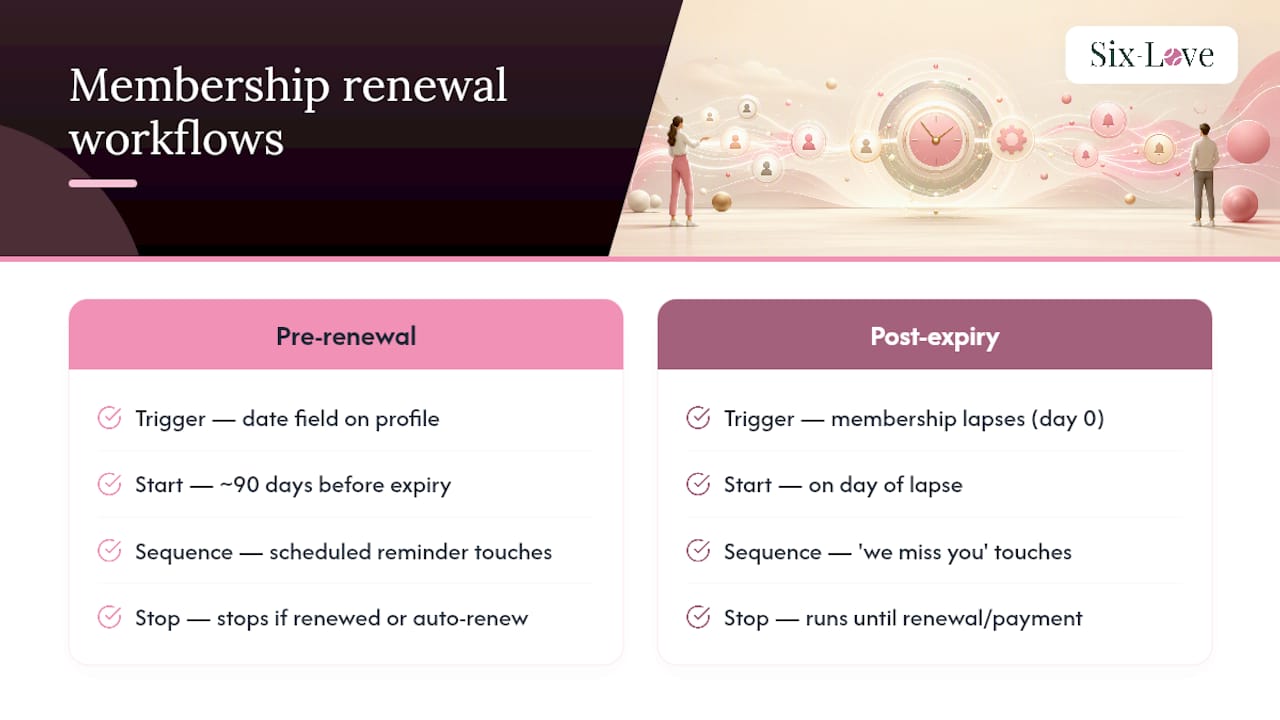
The post-expiry (overdue) workflow kicks in the day a membership lapses. Rather than assuming the member is gone, this sequence moves them into a grace period with limited or continued access, sends a distinct set of “we miss you” style messages, and often includes a modest incentive by the second or third touch. GrowthZone’s workflow documentation lays out exactly how these two workflows should map to membership records, with separate templates and separate trigger logic for each stage.
Sample timing table
| Days relative to expiry | Channel | Purpose |
|---|---|---|
| -90 | First notice, value recap, renewal link | |
| -60 | Email + portal banner | Reminder with saved payment prompt |
| -30 | Email + SMS | Urgency, corporate accounts flagged for PO |
| -7 | Final pre-expiry reminder, one-click renewal | |
| 0 | Expiry notice, grace period explained | |
| +7 | Grace period reminder, access status | |
| +30 | Email + SMS | Win-back offer, last chance before removal |
| +60 | Final win-back attempt or account closure notice |
Build exit conditions into every stage of this sequence:
- Member opts into auto-renew: sequence stops immediately, replaced by a payment confirmation email.
- Payment succeeds mid-sequence: all further reminder touches are cancelled automatically.
- Member manually cancels: move them to a separate “former member” list, not the renewal sequence.
- Corporate account submits a purchase order: pause the sequence and route to a human account owner rather than continuing automated touches.
What core system components do you need to configure?
Before any of this works reliably, you need four pieces talking to each other correctly, plus a handful of policies written down before you flip the switch.
- A canonical member profile. One record per member holding expiry date, payment method, auto-renew flag, and consent status. If your booking system and your billing system disagree about who’s active, your reminders will be wrong.
- A member portal with prefilled renewal links. Members should land on a form that already knows their name, membership tier, and expiry date, rather than typing it all in again.
- A payment gateway that supports recurring charges and retries. This is what makes auto-renew and dunning logic possible at all.
- An automation engine or CRM scheduler. Something has to orchestrate the actual sending, timed against each member’s individual expiry date rather than a single calendar blast.
- Written policies covering auto-renew opt-in and opt-out, grace period length, retry rules, and what data you’re allowed to use in messaging.
CiviCRM’s Schedule Reminders feature is a good reference point here: it documents checksum token links for prefilling renewal forms and built-in scheduling for rolling memberships, which is roughly the architecture most club systems converge on regardless of vendor.
Pro Tip: Run a “silent” test cohort of ten members through the full sequence before switching it on for everyone. You’ll catch broken merge fields and wrong dates in days rather than discovering them when fifty members complain at once.
Before you turn automation on, confirm: every member record has a valid expiry date, every payment method on file is current, your grace period length is decided and documented, and someone owns the corporate/PO exception path.
What is the best reminder schedule for membership renewals?
The The 90/60/30 cadence, recommended by both i4a and US Tech Automations, works because it matches how people actually make renewal decisions: early awareness, a mid-point nudge, then urgency close to the deadline. Rolling memberships (monthly or ongoing subscriptions) need a tighter version of this, often compressed into 14/7/0 days, since the decision window is naturally shorter. Corporate and league accounts should be pulled out entirely and given up to 90 days’ lead time with a purchase-order-friendly path, because procurement cycles rarely move at consumer speed.
Here’s what each touch in the sequence should actually say:
- 90 days out: Lead with value, not urgency. Recap what the member used this year, courts booked, coaching sessions attended, matches played, and mention the renewal link without pressure.
- 60 days out: Reintroduce the renewal link, highlight the saved payment method if one’s on file, and mention any pricing changes coming.
- 30 days out: Add urgency and a second channel, SMS alongside email. This is where corporate accounts should already have been diverted to a PO conversation.
- 30 days after expiry: A warm “we noticed you’ve lapsed” message with a straightforward reactivation link, no guilt-tripping.
- 60 days after expiry: A modest incentive, a free guest pass or a coaching credit, framed as “come back and see what’s new.”
- 90 days after expiry: Final attempt, often the most direct: “this is your last reminder before we archive your account.”
For subject lines, test dated urgency against generic framing: “Your court access expires 15 March” tends to outperform “Time to renew your membership” because it’s specific and actionable. Merge fields worth using throughout: member first name, membership tier, exact expiry date, amount due, last four digits of the saved card, and a one-line benefits recap pulled from their booking history.
How do you recover failed membership payments automatically?
Run three to four retry attempts over 7 to 14 days, starting with a silent retry the member never sees, before sending any customer-facing failure message. This is standard dunning practice, and it matters because a meaningful share of card declines are simple issues, an expired card, a temporary insufficient-funds flag, that resolve themselves on a second attempt without any member ever needing to know there was a problem.

The failure-facing email matters more than clubs think. “Your payment didn’t go through” reads as an accusation; “We had trouble processing your renewal, here’s a quick link to update your card” reads as a helpful nudge. The difference in click-through is real, even without a formal test to cite. Track three numbers here: recovery rate by attempt number (so you know which retry is actually doing the work), average time to resolution, and involuntary churn rate, meaning members lost to payment failure rather than a deliberate decision to leave.
If a member reaches the end of the retry timeline with no resolution, move them into the standard win-back flow rather than closing the account outright. Reserve outright closure for members who’ve been unreachable across email, SMS, and a portal notification for the full grace period.
How long should a membership grace period be?
Thirty days works for most individual memberships; extend to 60 or even 90 days for corporate accounts and seasonal memberships where a purchase order or a slower renewal cycle is normal. A grace period that’s too short pushes people out before your win-back sequence has had a chance to work; one that’s too long lets lapsed members keep full access with no incentive to actually renew.
- Full access grace period: Members keep booking rights during the grace window, which is generous but works well for high-value or long-tenure members you don’t want to frustrate over a payment hiccup.
- Limited access grace period: Members can view bookings and their portal but can’t make new reservations until they renew, a reasonable middle ground for most clubs.
- Read-only grace period: Members can log in and see their history but nothing else, appropriate for accounts well past the point of good faith.
In your reporting, tag accounts with a clear status field, something like status: in_grace alongside a grace_expires_on date, so your dashboards and your front-desk staff can both see at a glance who’s in limbo and when that window closes.
Publish a short, plain policy to members before you switch this on: how long the grace period lasts, what access looks like during it, and what happens if it expires with no renewal. Members tolerate policy far better than they tolerate surprises.
How do you segment members for renewal reminders?
Build four or five segment rules before you launch anything, rather than sending one sequence to everyone:
- Expiring within X days: the core segment driving your 90/60/30 sequence.
- Auto-renew opted in: exclude these members from renewal reminders entirely; send them a payment confirmation instead.
- Corporate or league accounts requiring a PO: route to a longer lead time and a human contact, not the automated consumer sequence.
- High-value, long-tenure members: consider a personal touch, a call or a handwritten note, rather than pure automation for your highest-value accounts.
On the technical side, checksum token links are what make prefilled renewal forms possible without asking members to log in every time. Best practice is a short time-to-live on each token, ideally single-use, so a forwarded email can’t be reused to renew someone else’s account or replay an old link after the member has already paid.
Your integration checklist before going live: confirm the canonical member record is the single source of truth across your booking system and your billing system, verify the payment gateway connection handles both one-off and recurring charges, test that your campaign scheduler respects each member’s individual expiry date rather than a shared calendar trigger, and run a handful of end-to-end test cases covering successful renewal, failed payment, and auto-renew opt-out.
Pro Tip: Timezone mismatches cause more silent automation failures than almost anything else. If your scheduler runs on UTC but your members are booking courts in Eastern time, “day 0” reminders can fire a day early or late. Check this explicitly during testing, not after launch.
Common technical issues worth checking before you scale: bounced emails usually trace back to stale addresses that were never cleaned during a system migration, which is worth resolving as part of any move away from manual booking systems. Token mismatches typically mean a link was copied incorrectly or has already expired. And if renewal charges are firing at odd hours, check your scheduler’s timezone setting against your gateway’s before assuming the automation itself is broken.
What metrics show renewal automation is working?
Track five numbers from week one: renewal rate, lapse rate, dunning recovery rate, auto-renew opt-in rate, and average time to renewal. A sixth worth adding once you have a baseline is support contacts avoided, the drop in “how do I renew” phone calls once self-service links are doing the work.
Run these tests once your baseline sequence has been live for a full cycle:
- Dated subject lines versus generic ones. “Your membership expires 15 March” against “Time to renew” as a straightforward A/B split.
- One-click renewal link versus portal landing page. Test whether skipping the login step entirely lifts completion rates.
- Three touches versus four in the pre-expiry sequence. More isn’t always better; test whether the extra touch improves renewal or just adds noise.
A simple ROI check you can run without a data team: take your estimated uplift in renewals from the new sequence, multiply by average membership value, then subtract whatever the automation setup cost you. If a 5% lift in renewals on a 400-member club paying $600 a year works out to roughly $12,000 in retained revenue against a modest setup cost, the case makes itself.
For guardrails, don’t declare a subject-line winner off fewer than a few hundred sends per variant, smaller clubs may need to let a test run across two or three renewal cycles before the sample size is meaningful enough to trust.
Which merge fields and security settings do renewal emails need?
Every renewal email should carry member name, membership tier, exact expiry date, amount due, the last four digits of the payment method on file, and a tokenised renewal link. That combination gives members everything they need to act in one glance, without forcing them to log in and hunt for the information themselves.
On token security, four things matter: set a short expiry window, ideally a few days rather than weeks; make each token single-use so it can’t be replayed; serve every link over HTTPS; and use HMAC signing where your platform supports it, so a token can’t be tampered with to access a different member’s record.
Leave a few things out of renewal emails entirely: full card numbers (last four digits only), full postal addresses unless directly relevant, and any internal account notes. Before sending automated messages, confirm the member’s consent flag is set correctly, someone who opted out of marketing communications shouldn’t receive promotional win-back offers even if they’re technically still a lapsed member.
Test tokens at scale before launch by generating a batch across different browsers and devices, particularly older mobile browsers, which sometimes mangle long query strings in ways desktop testing won’t catch.
What results can clubs expect from automating renewals?
A mid-sized racquet club running roughly 350 memberships switched from a single manual reminder email to a full 90/60/30 automated sequence with auto-renew and dunning built in. Within the first renewal cycle after implementation, staff reported a marked drop in the manual chasing that used to eat several hours a week, time that shifted toward coaching programme growth and event planning instead.
The implementation order that worked: the canonical member database and expiry-date fields went in first, since nothing else functions without accurate data underneath it. Auto-renew was then promoted heavily at the front desk and during signup, not buried in a settings menu, which meant a meaningful share of new members opted in from day one rather than needing to be won over later. Failed-payment recovery came last, layered on once the core reminder sequence was stable and the team trusted the data feeding it.
The biggest shift wasn’t the software, it was that renewals stopped being something a staff member had to remember. Once the system tracked expiry dates automatically, our front desk could focus on the member standing in front of them instead of chasing spreadsheets.
That kind of operational relief, MemberClicks’ research on automated renewals notes, is often the underrated benefit: automation doesn’t just lift renewal numbers, it frees staff hours that were previously absorbed by manual tracking and follow-up calls.
What actually matters when you roll this out
The first ninety days of any renewal automation project should be spent almost entirely on data hygiene and the core sequence, not on bells and whistles. Get the 90/60/30 cadence firing correctly against accurate expiry dates before you even think about SMS, personalisation branches, or a fourth touch. Clubs that try to build the perfect system on day one usually end up with a fragile one that nobody trusts enough to leave switched on.

Over-automation is the mistake I see most often. Clubs get excited, build an eight-touch sequence with three channels, and end up irritating members who feel chased rather than reminded. Three to five well-timed touches beat eight mediocre ones every time. The second most common mistake is treating corporate and league accounts the same as individual memberships, sending them the same consumer-facing urgency emails when what they actually need is a purchase order conversation with a named contact. And the third, quietly damaging one is poor token security, reusable links sitting in old emails that can be forwarded or replayed months after they should have expired.
One tweak that consistently delivers fast results: moving auto-renew promotion to the point of signup rather than leaving it as an afterthought in account settings. Members are at their most enthusiastic the day they join. Ask then, and opt-in rates climb meaningfully compared with asking six months later during a routine reminder email.
How Six-love handles renewal automation for racquet clubs
If you’re running a tennis, padel, or pickleball club and mapping this checklist against your current setup, most of the pieces above, member portal, saved payment methods, configurable reminder schedules, and reporting, are exactly what a court reservation and club management platform needs to get right. Six-love’s member portal supports prefilled renewal tokens and saved payment methods natively, so members renew in a couple of clicks rather than re-entering their details every year, and your team gets real-time reporting on who’s expiring, who’s lapsed, and who’s stuck in a grace period.

For clubs just getting started, the sensible order is: enable the member portal and payment saving first, turn on the 90/60/30 reminder cadence second, then layer in auto-renew promotion and failed-payment retries once the core sequence is running smoothly. Six-love’s bespoke approach means a padel club with heavy corporate bookings can configure a different renewal path to a tennis club running mostly individual annual memberships, rather than forcing every club through the same rigid template. If you want to see how this maps to your own membership structure, request a demo or explore pricing and plans to work out which tier fits your club size.
Five things to do in your first 30 days
Automating membership renewal reminders works because it removes human forgetfulness from a process that depends on precise timing, and clubs that combine a 90/60/30 cadence with auto-renew and dunning logic see both higher renewal rates and fewer staff hours spent chasing payments.
- Set your 90/60/30 cadence and confirm it’s firing off each member’s individual expiry date, not a shared calendar trigger.
- Test every renewal token across at least two browsers and a mobile device before sending a single live reminder.
- Enable payment retries with at least one silent retry before any member-facing failure message goes out.
- Publish your grace period policy in plain language so members know exactly what happens if they lapse.
- Measure your baseline renewal rate and lapse rate now, before automation launches, so you have something real to compare against in 60 days.
After 30 days, expect a modest but visible uplift in renewal rate, a drop in “how do I renew” support enquiries, and cleaner reporting on who’s in your grace period versus who’s genuinely gone. When you introduce auto-renew as an option, tell members plainly what it means, when they’ll be charged, how to opt out, and where to update payment details, since an unexplained auto-renewal is one of the fastest ways to generate complaints even when the feature itself is a genuine convenience.
Sources
For the underlying architecture of scheduled reminders and checksum tokens, CiviCRM’s membership renewal documentation is the clearest technical reference. For sample multi-touch sequences and channel-mixing benchmarks, US Tech Automations’ renewal automation guide is worth a close read. If your club wants a self-hosted or custom scheduling layer rather than relying on a CRM’s built-in tools, Reminder-Engine on GitHub documents a modular, multi-channel approach worth reviewing with your developer. Fitness and coaching operators building similar renewal flows can also look at how membership signup pages like BodiesByMahmood’s membership page structure their opt-in messaging.
- CiviCRM membership renewals documentation
- Membership renewal automation how‑to | US Tech Automations
FAQ
What is the best cadence for automated renewal reminders?
A 90/60/30 day pre-expiry sequence works well for most annual memberships, tightened to 14/7/0 days for rolling or monthly subscriptions, based on the sequences documented by i4a and US Tech Automations.
How long should a membership grace period last?
Thirty days suits most individual memberships, while corporate accounts and seasonal memberships often need 60 to 90 days to accommodate purchase order cycles.
How many payment retry attempts should you allow before a membership lapses?
Three to four attempts over 7 to 14 days, starting with a silent retry, gives simple card issues time to resolve before you send a customer-facing failure message.
Can Six-love automate renewal reminders for racquet clubs?
Yes, Six-love’s member portal supports saved payment methods and prefilled renewal links, and clubs can configure reminder schedules alongside the platform’s existing booking and reporting tools.
What data privacy rules apply to automated renewal emails?
Automated renewal messages should respect the consent flags a member has set and comply with regulations like GDPR or CAN-SPAM, meaning you confirm marketing opt-in status separately from transactional renewal notices and always include a clear way to update preferences.
Recommended
- Why clubs track court booking history: a practical guide
- General · Six-Love Blog
- Migrating from manual booking systems: a club manager’s guide
Frequently Asked Questions
What is the best cadence for automated renewal reminders?
A 90/60/30 day pre-expiry sequence works well for most annual memberships, tightened to 14/7/0 days for rolling or monthly subscriptions, based on the sequences documented by i4a and US Tech Automations.
How long should a membership grace period last?
Thirty days suits most individual memberships, while corporate accounts and seasonal memberships often need 60 to 90 days to accommodate purchase order cycles.
How many payment retry attempts should you allow before a membership lapses?
Three to four attempts over 7 to 14 days, starting with a silent retry, gives simple card issues time to resolve before you send a customer-facing failure message.
Can Six-love automate renewal reminders for racquet clubs?
Yes, Six-love's member portal supports saved payment methods and prefilled renewal links, and clubs can configure reminder schedules alongside the platform's existing booking and reporting tools.
What data privacy rules apply to automated renewal emails?
Automated renewal messages should respect the consent flags a member has set and comply with regulations like GDPR or CAN-SPAM, meaning you confirm marketing opt-in status separately from transactional renewal notices and always include a clear way to update preferences.